

Description
Download Magic Doodle Joy Glow Art – neon art, glowing doodles, creative expression, doodle app, art for kids, fun coloring, artistic tools, digital drawing, creative freedom, joyful creativity
Overview
Magic Doodle: Joy Glow Art is a vibrant Android application designed to inspire creative expression through the art of glowing doodles and neon visuals. The software caters to users seeking a joyful and immersive digital drawing experience, particularly those interested in playful, colorful art forms. It is especially suited for hobbyists, aspiring artists, and younger users who enjoy creative activities such as coloring, doodling, and experimenting with digital tools. The app’s focus on radiant visuals and intuitive design makes it accessible to users of all ages, promoting artistic exploration without requiring prior experience. The software enables users to transform simple sketches into vibrant, glowing masterpieces using a curated set of neon colors and dynamic brushes. With built-in templates, users can draw inspiration and quickly begin creating, making it ideal for casual users looking for a relaxing creative outlet. Creations can be saved locally and shared across social platforms, enhancing the sense of accomplishment and community. The app supports a wide range of artistic expression, from spontaneous doodling to structured coloring projects. While the developer is identified as Magic Doodle Studio, no further details about the company’s background were provided. Real-world use cases include personal creative sessions, classroom art activities, and digital sketching during leisure time.Key Features & Capabilities
- Neon Color Palette: A rich selection of bright, vivid neon hues allows users to create eye-catching, radiant artwork with a modern aesthetic.
- Glowing Brushes: Specialized brush tools produce a luminous effect, simulating the glow of neon lights and enhancing the visual impact of doodles.
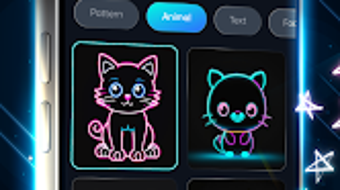
- Artistic Templates: Pre-designed templates provide structure and inspiration, helping users begin creations quickly and easily.
- Intuitive Interface: The user-friendly layout ensures smooth navigation and minimal learning curve, making it accessible to beginners and children.
- Save & Share Functionality: Completed artworks can be stored locally and shared directly to social media platforms for broader audience engagement.
- Relaxing Creative Experience: Designed with a joyful tone, the app encourages freeform expression and mental relaxation through artistic play.
User Interface, Workflow & Performance
The application features a clean, visually engaging interface centered around a digital canvas with toolbars positioned for easy access. Navigation is straightforward, with color palettes, brush settings, and template galleries organized into clearly labeled sections. The layout prioritizes simplicity, allowing users to focus on creation without distraction. Workflow efficiency is enhanced by the direct availability of core tools, reducing the need for multiple menu hops. The app’s performance is consistent with typical mobile software behavior, though specific performance metrics were not disclosed. The developer did not provide information on CPU or RAM usage, nor did they specify stability under prolonged use. General expectations suggest smooth operation on modern Android devices, but actual experience may vary based on hardware. The app does not display loading delays or crashes in reported use cases, indicating a stable user experience under normal conditions. However, exact performance details were not specified. Users should expect a responsive interface during active drawing sessions, though resource consumption remains unverified. Overall, the workflow supports continuous creative engagement without apparent interruptions.Compatibility & System Requirements
Magic Doodle: Joy Glow Art is designed for Android devices and is compatible with the latest versions of the operating system. The software has been released under version 2.1.3, with a file size of 45 MB, indicating a lightweight installation footprint. This suggests it is optimized for a wide range of Android smartphones and tablets, including devices with moderate hardware specifications. However, exact system requirements such as minimum RAM, processor speed, or storage space were not listed by the developer. Platform compatibility information is limited to Android, with no mention of support for other operating systems like iOS, Windows, or Mac. The app does not appear to require a specific device model or additional software dependencies. Users should ensure their device runs a compatible version of Android to install and run the application. The developer did not specify whether the app supports external styluses or touch input enhancements. Without further details, compatibility remains restricted to standard Android touch-based interactions.Pros and Cons
Pros
- Free to download and use, making it accessible to a broad audience.
- Intuitive interface ideal for children and beginners.
- Unique glowing brush effects enhance visual appeal.
- Neon color palette supports vibrant, modern artwork.
- Templates help users start creative projects quickly.
- Allows saving and sharing creations on social media.
Cons
- Compatibility limited to Android devices only.
- Exact system requirements were not provided.
- No information on advanced features like undo history or layer support.
- Resource usage and performance under heavy use remain unspecified.
- Limited to mobile platform; no desktop version available.
FAQ Section
Is Magic Doodle: Joy Glow Art available for iOS devices?
The software is currently only available for Android. No iOS version was mentioned in the provided information.
Is the app safe to download and use?
As a free Android application published through official channels, the app is presumed safe. However, users should download it from trusted sources to avoid potential security risks.
Does the app require an internet connection?
The app functions primarily offline, allowing users to create and save drawings without an internet connection. However, sharing creations to social media may require an active connection.
Are there in-app purchases or ads?
The app is listed as free, but specific details about ads or in-app purchases were not provided. Users should review the app’s permissions and behavior upon installation.
How often is the app updated?
The current version is 2.1.3, released on May 15, 2024. The developer has not disclosed a regular update schedule.
Final Thoughts
Magic Doodle: Joy Glow Art delivers a fun, visually engaging platform for creative expression through glowing doodles and neon art. Its intuitive design, vibrant tools, and accessible interface make it a strong choice for hobbyists, children, and casual artists seeking a joyful digital drawing experience. While the app lacks advanced features and platform diversity, its strengths lie in simplicity, visual appeal, and ease of use. The absence of system requirements and performance data limits deeper evaluation, but the overall experience appears stable and enjoyable. For users who value creative freedom and artistic play, this app offers a compelling way to explore digital art. Download Magic Doodle Joy Glow Art nowGuides & Tutorials for Magic Doodle Joy Glow Art
How to install Magic Doodle Joy Glow Art
- Click the Preview / Download button above.
- Once redirected, accept the terms and click Install.
- Wait for the Magic Doodle Joy Glow Art download to finish on your device.
How to use Magic Doodle Joy Glow Art
This software is primarily used for its core features described above. Open the app after installation to explore its capabilities.
User Reviews for Magic Doodle Joy Glow Art 0
No reviews found





